
A dental practice switches to a new booking system on a Monday. The setup guide asks for one line in the domain's DNS, the practice manager pastes it in, and reminders start going out. A week later two patients ring to say the monthly invoice never arrived. It did. It's sitting in their spam folder, because that one extra line pushed the practice past a limit the setup guide never mentioned. At Cents Security we see this pattern often enough that we built a check for it.
What your SPF record does
Your SPF record lists the services allowed to send email as your domain. Every tool you connect that sends mail for you, from the newsletter to the invoicing software, adds itself to that list.
When a message arrives claiming to be from you, the receiving server reads the list and checks the sender is on it. That's one of three checks, and we've written up how SPF, DKIM and DMARC work together if you want the wider picture.
Where the limit of ten comes from
The SPF standard, RFC 7208, caps the DNS lookups a receiving server will make to check one message at ten. Each line in your record can send that server off to fetch another record, and without a cap a badly written record, or a deliberately nasty one, could keep it busy for every email it gets. The NCSC describes the cap as protection for mail servers against being overwhelmed. So the SPF lookup limit comes from the standard itself, and the large email providers apply it to every message they receive. You can't ask Gmail for an exception, and your own email provider can't raise it for you.
What counts as a lookup
Most records lean on two terms that cost one lookup each: include, which points at another company's list, and mx, which points at your mail servers. The rarer a and ptr terms cost one too, and so do exists and redirect. The ip4 and ip6 terms cost nothing, because the address is written right there in the line.
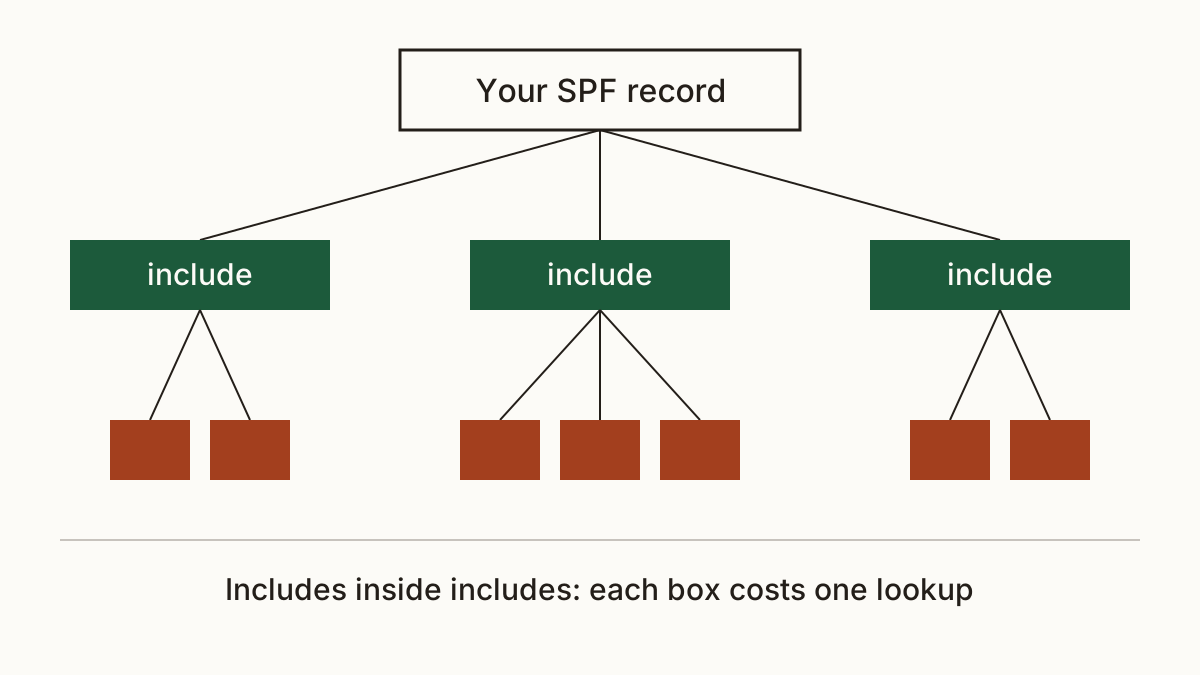
The catch is nesting. An include points at another company's record, and that record can hold includes of its own. Microsoft's documentation warns about exactly this: a record with five lines can still need twelve lookups. Here's a short one:
v=spf1 include:spf.protection.outlook.com include:_spf.google.com include:mail.zendesk.com ip4:192.0.2.10 ~all
That reads as three lookups. The real number depends on what each of those three companies publishes today, and they change it without asking you.
What happens when you pass ten
The standard calls it a permanent error, and the SPF check fails. Not for the eleventh service. For everything.
Your genuine mail loses its SPF pass, so it's more likely to land in spam. If you've set up DMARC, it now has only DKIM to go on, and any tool you never set DKIM up for starts failing outright. We'd treat this as the quiet kind of problem: nothing bounces, nobody gets an error, and you hear about it when a customer says they never got the quote.
How to count your lookups
Our check will count the lookups in your SPF record and flag it when there are more than ten. One honest caveat: we count the terms in the record itself, not the records its includes point to. So the real total can be higher than the number we show, never lower. If we report eight, a nested include could still tip you over.
The result goes to whoever looks after your domain's DNS. For most owners that's the agency that set up Microsoft 365 or Google Workspace, or the developer who built the site. If you look after the DNS yourself, the fix is a text edit in your domain registrar's control panel, and the next sections walk through what to change.
Getting back under ten
Start with what you no longer use. Plenty of records carry an include for a tool someone trialled and then cancelled, and nobody went back to tidy up. Deleting those lines costs nothing and is the safest fix, though it's worth asking whoever manages your accounts before removing anything you don't recognise. A line you've never heard of may belong to the accounts package.
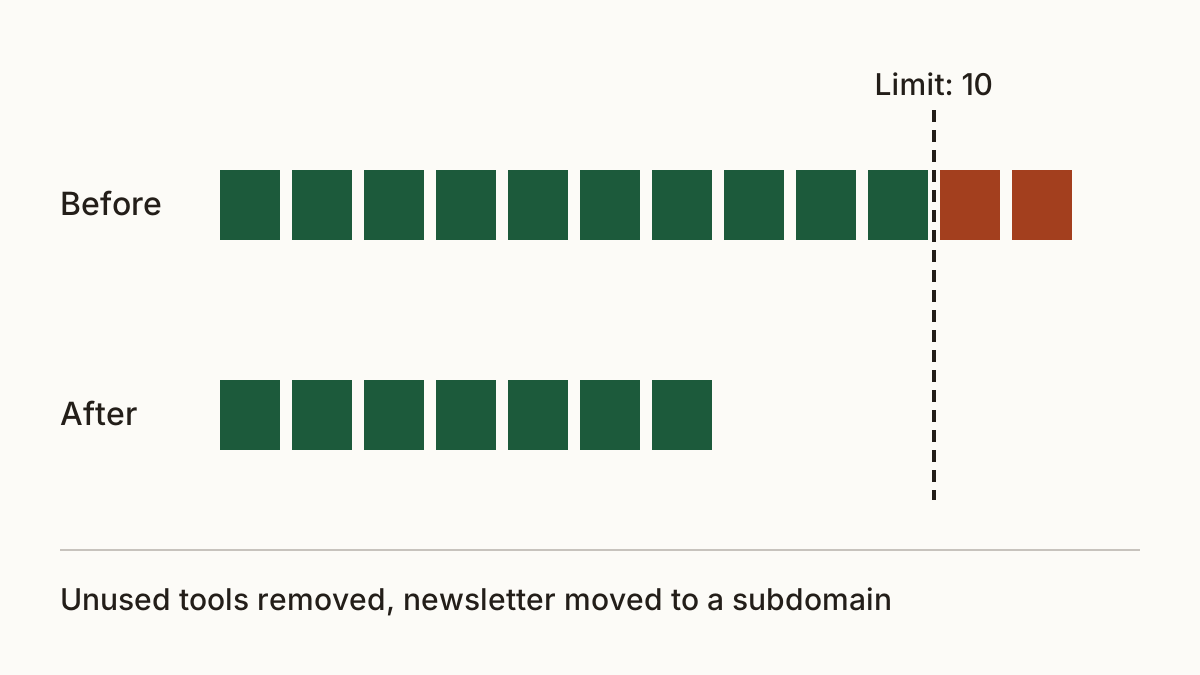
Next, move bulk senders off your main domain. A newsletter can send from a subdomain such as news.yourdomain with its own record, which is what the NCSC suggests for records that grow too large. Your main SPF lookup limit then only has to cover the tools that send as you day to day.
Flattening is the last resort. It swaps includes for the actual addresses, which cost no lookups. But providers move their sending servers around, and when they do, a flattened record goes stale and the mail from that tool starts failing again, with no warning to you. We'd only flatten with a service that rebuilds the record whenever a provider's list changes.
What to send your email provider or developer
Forward this: "Our SPF record needs more than the ten DNS lookups the standard allows, so receiving servers treat it as a permanent error. Please remove includes for services we no longer use and move the newsletter to a subdomain, so the record stays under ten." For most small businesses that's under an hour of work.
FAQ
Do ip4 and ip6 lines count towards the limit?
No. They hold the address itself, so the receiving server has nothing to look up. You can add as many as you need without touching the SPF lookup limit.
Can I publish two SPF records to get round it?
No. Two SPF records on one domain is itself an error under the standard, and the check fails the same way. Merge them into one record instead.
Is SPF flattening safe?
It works until a provider changes its addresses. We'd only use it with a tool that rebuilds the record automatically, never as a one-off edit someone forgets about.
Check your website and see what each problem on it costs you at https://www.cents-security.com/.