A customer rings to ask why you haven't marked their invoice as paid. They paid it last week, to the new bank details in your email. Except you never sent that email. It came from an address one letter off yours, with your signature copied in, and the customer had no reason to look twice. The money went to a stranger's account, and the first you hear of it is that phone call.
Why a lookalike domain with email set up deserves a look
Registering a name close to yours isn't wrongdoing. Some near misses belong to unrelated businesses with similar names, and a few may already belong to you, bought years ago by whoever set up the site. We don't flag a domain because it exists.
What changes the picture is mail records. A domain that can send and receive email has been set up for a reason, and when it's a misspelling of your domain, the usual reason is to write to your customers as you. The NCSC calls this business payment fraud: a convincing message, an invoice or a "we've changed banks" note, and a payment that lands in the wrong place. Nobody needs to break into your systems for it to work.
How lookalikes are made
Most are made by small edits a tired reader won't catch. Take a made-up business at harbourbakery.co.uk. A dropped letter gives harbourbakry.co.uk. Two swapped letters give harbuorbakery.co.uk, and a doubled one gives harbourbakkery.co.uk. Replace a letter with its neighbour on the keyboard and you get harbourbakeey.co.uk.
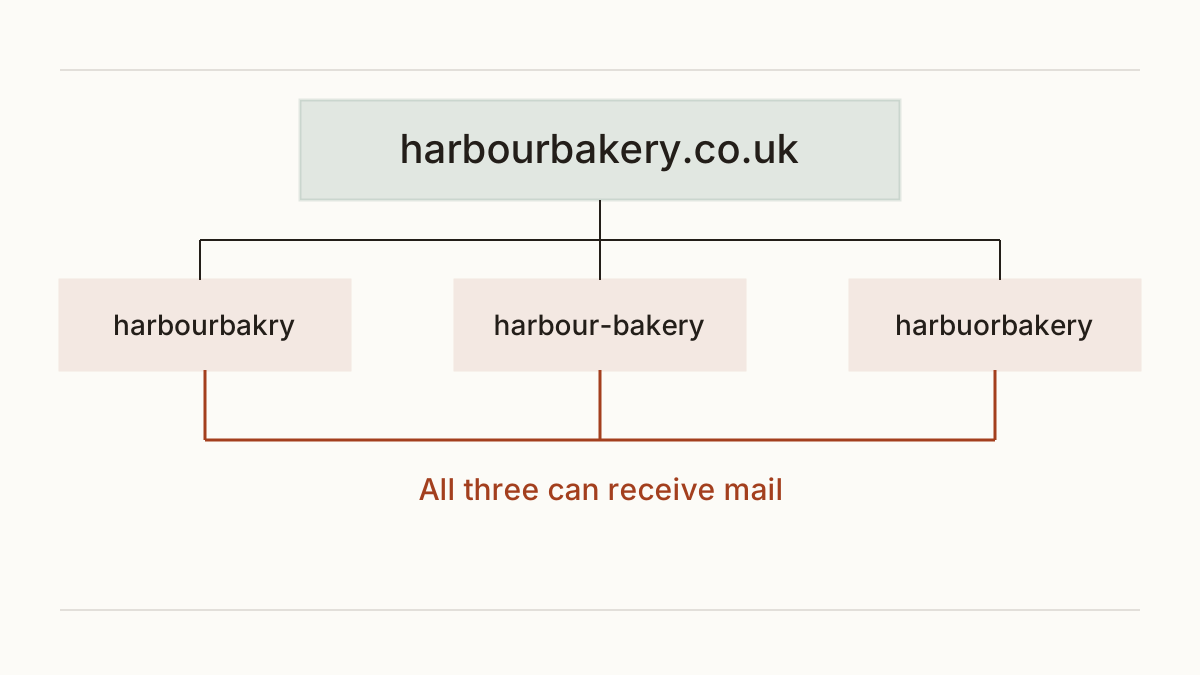
Then there are the tricks that work on the eye rather than the fingers. An added hyphen (harbour-bakery.co.uk) looks like a tidier version of your own name. A lowercase L in place of a capital I, an "rn" that reads as "m", or a letter from another alphabet that's drawn the same way: on a phone screen these are close to invisible. This is typosquatting aimed at your customers' inboxes rather than their browsers.
Why your own email records don't stop it
People who've set up SPF, DKIM and DMARC often assume they're covered. They're covered for their exact domain. Those records tell the receiving mail server which messages really came from harbourbakery.co.uk, and what to do with the ones that didn't.
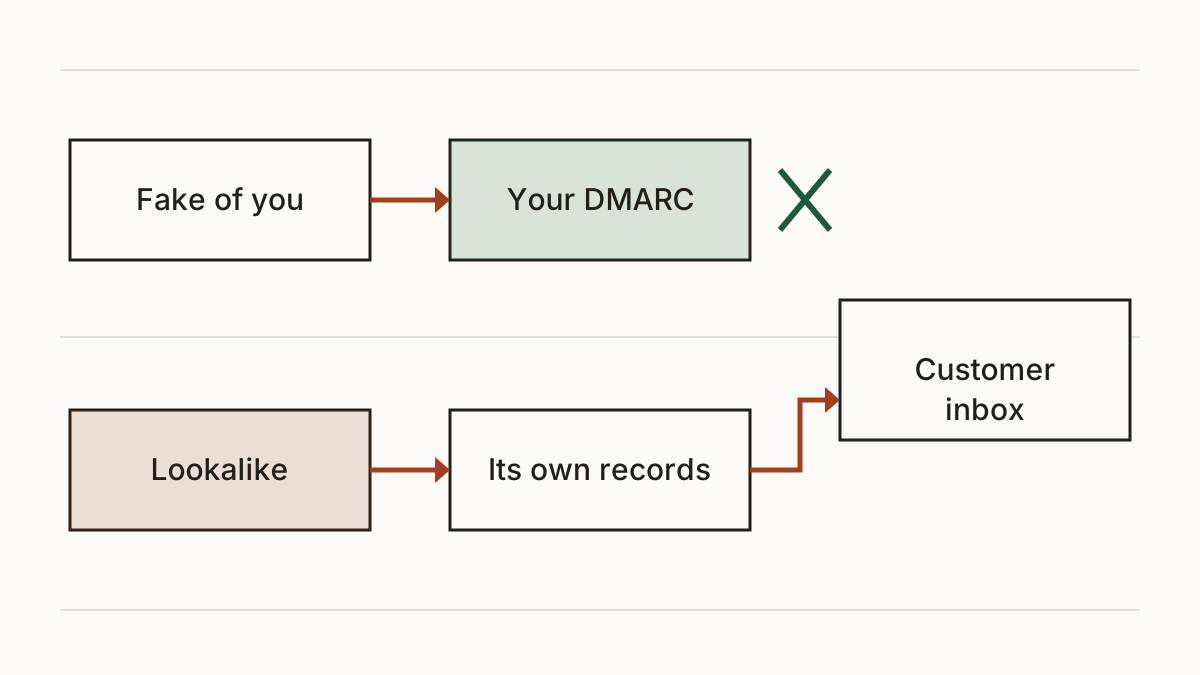
A lookalike is a different domain. Its owner publishes records of their own, and their mail passes every check, because it really does come from harbourbakry.co.uk. Your DMARC policy has nothing to say about it. So the records are still worth having (they stop the cruder fake that uses your real address), but they're half the job.
How to find lookalikes of your domain
Could you type out every misspelling of your domain and look each one up by hand? Not sensibly. Our free scan does it for you: it will check for lookalike domains with email set up, building dozens of variations of your name and asking for each one's mail records. Only the ones that can send or receive mail appear in the report.
We leave out your name on other endings, such as .com next to your .co.uk. That's almost always you, or a business that has nothing to do with you, and listing them would bury the ones that matter.
When something turns up, our first question is whether it's yours. Ask whoever registered your domain, and check your registrar account for names you forgot about. If it isn't yours and it has mail records, treat it as live until you know otherwise.
What protects you, cheapest first
The cheapest fix is a sentence. Put a line on every invoice and in your email footer saying your bank details never change by email. It costs nothing and gives a careful customer a reason to stop.
Next, a habit on your own side: confirm any change of a supplier's bank details by phone, on a number you already have, never one from the email asking. The same trick runs the other way, with a fake supplier writing to you.
Then set your own domain's DMARC to reject, so nobody can send mail from your exact address. Our guide on how to set your own domain's DMARC to reject covers who does it and what to send them.
Registering the closest misspellings yourself is optional. It takes a few names off the table, but there are always more, and on its own it stops nothing.
What to do if one is used against you
Forward the phishing email to the NCSC's Suspicious Email Reporting Service at report@phishing.gov.uk. They can get the sending address and any linked site taken down.
If a customer has already paid, the clock matters. The NCSC's advice is to contact your bank at once, through the number on its own website or your card, and the customer should call theirs the same way. Banks can sometimes stop or recover a payment when they hear quickly.
Then tell the customer plainly what happened and what you're doing. They'll trust a straight phone call more than silence. We don't give legal advice on who bears the loss; a solicitor can.
FAQ
Is a lookalike domain always a scam?
No. Many belong to unrelated businesses or to you, and plenty have no mail records at all. The ones worth a look are the close misspellings that can send email.
Should I buy every misspelling of my domain?
No, there are too many to cover. A line on your invoices and a phone check before any payment change protect you more than a drawer full of domains.
Can I make someone hand over a lookalike domain?
Sometimes. Domain registries run dispute procedures for names registered in bad faith. We don't give legal advice, so check the registry's current guidance before you start.
Check your website and see what each problem on it costs you at https://www.cents-security.com/.