Picture a physiotherapy clinic owner who read about llms.txt over a weekend, asked their web developer to add one, and got a thumbs-up on Monday. Now there's a file at the end of their web address, and they have no idea whether anything reads it, or whether it's even written properly. Whether the file is written properly is something you can answer today, in about five minutes. The first one nobody outside the assistant companies can answer for you, and we'd be wary of anyone who says they can.
What an llms.txt file is for
It's a short Markdown file at your site root that tells an assistant what your business is and which pages to read first. It's a proposal published at llmstxt.org, nothing requires it, and no ranking depends on it.
So how much does a broken one cost you? We don't know, and we won't pretend to. Cents Security prices every problem it finds in money lost a month, with the sources on show, and we can't source a single pound lost to a badly formatted llms.txt. That's why our check gives a faulty file a note with no price on it. Fix it because it's cheap, not because someone frightened you.
The shape the format asks for
The proposal is short, and the shape is strict. Your business name as an H1 heading on the first line. Then, if you want one, a one-line summary written as a quote. Then H2 sections, each a list of Markdown links with a few words after each. For a dental practice in Leeds, the whole thing can be this small:
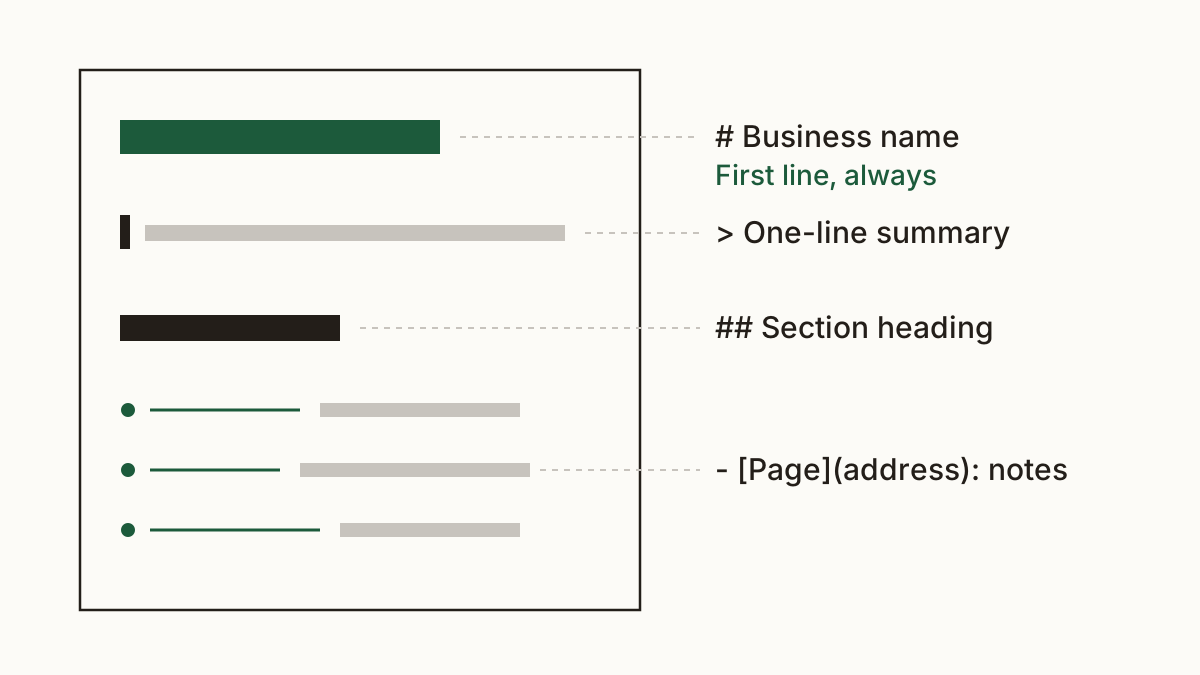
# Riverside Dental
> NHS and private dentist in Leeds, open six days a week.
## Pages
- Prices (link to /prices): what a check-up and a clean cost
- Book (link to /book): online booking, same-week slots
In the real file each line in the list is a proper Markdown link, written as the name in square brackets followed by the address in round brackets. Follow llmstxt.org and add nothing it doesn't describe. We often find paragraphs of instructions addressed to the assistant, or long keyword lists pasted in for good measure. Neither is in the format, and a reader built to the proposal has no reason to treat them as anything but noise.
Mistakes that make the file unreadable
Software reads this file, not a person, so small slips matter more than they would on a web page. These are the four we find most.
No heading on the first line
If line one says "Welcome to our website", or the name sits on line three under some notes, the file has no name as far as a parser is concerned. The format asks for a single # and your business name, right at the top.
Plain addresses instead of Markdown links
A list of bare web addresses looks fine to you. To a reader expecting name, it's plain text with no links in it, which means there's nothing to follow.
Your site's own page instead of the file
Open the address in a browser. If you see your site's design or its page-not-found page, the file isn't there. Some website builders answer every unknown address with a normal page, so the server says all is well while there's no file at all.
Links to pages that no longer exist
Sites get rebuilt and addresses change, and nobody thinks to reopen a text file after a redesign. A link to last year's /services-2 that now lands on an error page sends the assistant nowhere, and it's the mistake that creeps in after the file was right.
How to validate llms.txt by hand
Type yourdomain.co.uk/llms.txt into a browser. You should see plain text, not a designed page. Check that the first line starts with # and your name, that the list lines are written as Markdown links, and then click through to each address to see it opens a real page. On a small site that takes five minutes.
Or let an llms.txt validator do the reading. Ours fetches the file, reads the first line and the links, and says which one is missing. You can run the llms.txt check on your own site without an account. We'd still click the links yourself afterwards, because a validator that only reads the shape won't tell you a page has moved.
When the file is fine and assistants still miss you
A perfect llms.txt does nothing if your robots.txt turns the assistant's crawler away at the door. We see this on sites where a plugin or a cautious developer blocked every AI crawler months ago and nobody remembered. The robots.txt rule wins.
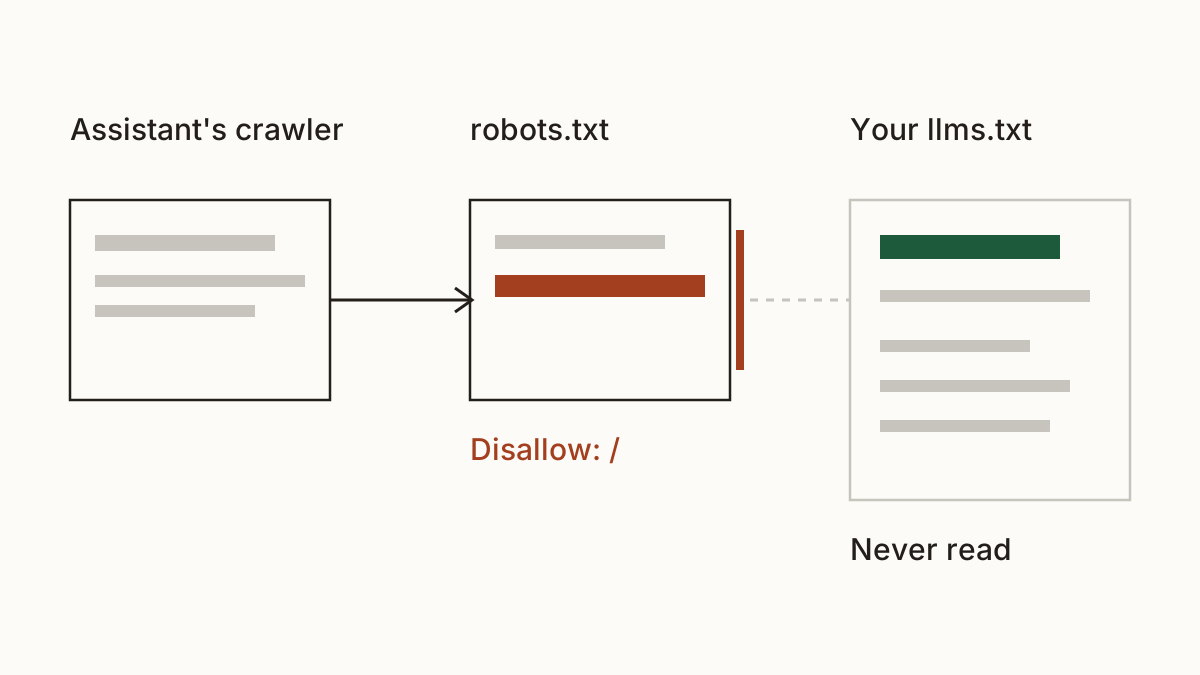
We won't claim to know which assistants read llms.txt today. The companies don't publish that, and it changes. What we can check is what stops assistants reading your site at all, and that's usually the bigger problem.
Who writes it, and what to send them
Your web developer, and it's about ten minutes of their time. You can draft the text yourself in a note: your name, one sentence about what you do and where, and the five or so pages a new customer needs.
Then forward this: "Please put this at our site root as llms.txt, formatted as llmstxt.org describes, with each page as a Markdown link. Please also check our robots.txt isn't blocking AI crawlers."
FAQ
Do I need an llms.txt file?
No. It's a courtesy to assistants, not a requirement from any search engine or regulator. If you have ten spare minutes of a developer's time, it's a tidy thing to have.
Will an llms.txt get me into ChatGPT's answers?
Nobody can promise that from outside, and anyone who does is guessing. An llms.txt validator can tell you the file is well formed. Whether an assistant uses it is the assistant's decision.
Is llms.txt the same as robots.txt?
No. Robots.txt says who may read your site, and crawlers that follow it obey it. Llms.txt only suggests what to read first, and an llms.txt validator checks that suggestion is readable.
Check your website and see what each problem on it costs you at https://www.cents-security.com/.