Picture a Tuesday morning at a dental practice. The booking page won't load. The shared inbox has gone quiet, and a patient rings to say their email to reception bounced. Nobody touched the website overnight. The domain has moved to a registrar the owner has never heard of, and everything that hung off that name went with it.
A transfer lock exists to stop that morning happening. Checking for one takes a couple of minutes. Most owners have never looked.
What a domain transfer lock does
A domain transfer lock is one setting at your registrar, the company you pay each year to keep your domain name. While it's on, the registrar refuses any request to move the domain to another company. It doesn't matter who sent the request. Nothing moves until you sign in and switch the lock off yourself.
At most registrars it's a single switch in the control panel. Some registrars turn it on by default when you buy the name. Others leave it off, and a name that has been moved between accounts can lose it on the way. We see it as a door you close, and closing it costs you nothing.
Why the lock matters
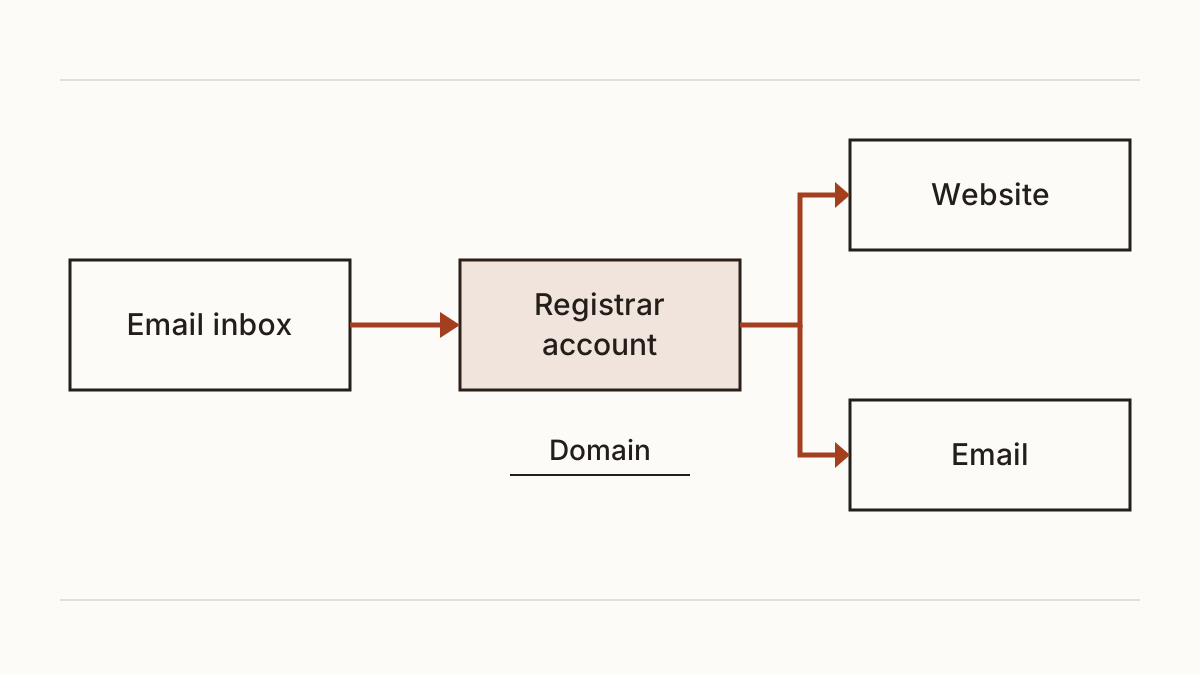
Your domain sits in a registrar account, and that account is tied to an email account. Get into the inbox and you can usually reset the registrar password. From there, requesting a transfer is a few clicks. Without a lock the name moves, and your website and your email go with it, because both point at the domain.
Getting a stolen domain back is slow. It means paperwork to prove the name was yours, and weeks of a dead site while customers try the next business on the list. And it often fails. So our rule is plain: prevention here is cheap and the cure isn't.
Theft isn't the only way a business loses its name, either. Our post on what happens when a domain name expires covers the other route, the renewal that nobody paid because the card on file had changed.
How to test whether your domain is transfer locked
You've got three ways to find out. Any one of them gives you the answer, and none of them needs a technical background.
Look up the status codes
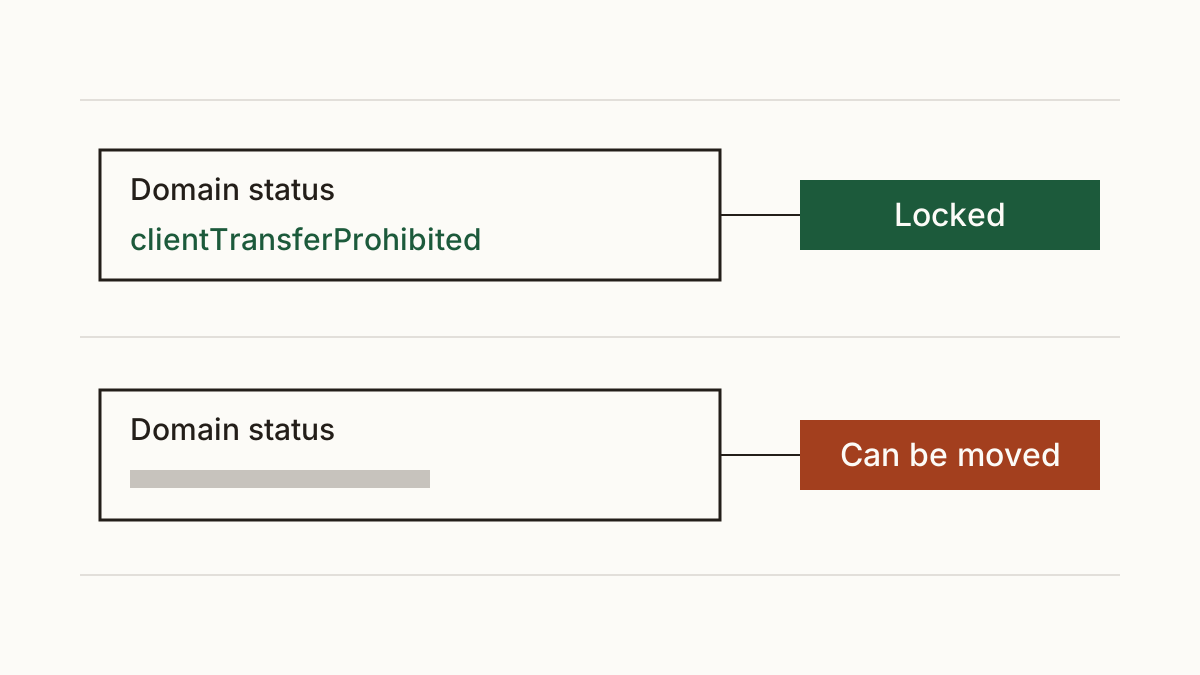
Open ICANN Lookup in your browser and type your domain. Scroll to the lines marked domain status. These are status codes the registry publishes, the same ones the old WHOIS record used to show.
If you see clientTransferProhibited, your registrar has locked the name. serverTransferProhibited means the registry has locked it at its end. If neither appears, the name can be moved by anyone who gets into the account. ICANN keeps a guide to EPP status codes that explains what each one means, which is handy when you see one you don't recognise.
Run our check
Cents Security reads the same codes through RDAP, the newer replacement for WHOIS, and tells you plainly whether a lock is there. You can test whether your domain is transfer locked without making an account. When there's no lock, the finding says who changes it and gives you a message to forward to them.
Look in your registrar's control panel
Sign in wherever you renew the domain. The setting is often called domain lock, registrar lock or transfer lock, and it usually lives on the domain's own settings page rather than in your account settings. Can't find it? We'd ask the registrar's support team, who can usually tell you in one reply.
How to turn the lock on
Sign in at your registrar and switch the lock on from the domain's page. For the name itself, you're done.
Then protect the doors around it. Turn on two-factor authentication for the registrar account, so a stolen password on its own isn't enough to get in. Do the same for the email address on the registration, because that inbox is where every password reset lands. If you've only got ten minutes today, we'd start with the inbox.
Leave the lock on. Switch it off only on the day you mean to move to another registrar, and turn it back on once the move has gone through.
Who holds your domain, and what to send them
In our experience plenty of owners don't have the login at all. The domain often sits in the account of a former developer who built the site, or with an agency you stopped working with years ago. That's common and it's fixable, but they have to act, not you.
Send them something like this: "Could you turn on the transfer lock for our domain, and two-factor sign-in on the account it's held in? Please reply once it's done so we can check it from our side." Then run the check again to confirm the lock shows up. While you've got their attention, ask them to move the domain into an account in your own name, so the next change doesn't depend on anyone else.
FAQ
Does a transfer lock stop my domain expiring?
No. Renewal is a separate setting, usually called auto-renew, and the lock does nothing for it. A locked domain that nobody pays for still lapses, so we'd check both at the same sitting.
Will the lock stop me moving to a new registrar?
No, it only adds a step. You switch it off at your current registrar, request the transfer at the new one, then turn the lock on again once the name arrives. The lock stops moves you didn't ask for, not the ones you did.
My domain ends in .uk. Does this apply?
Not in the same way. Nominet runs .uk names, and transfers there work its own way. Ask your registrar how your .uk domain is protected against a move you didn't request.
Check your website and see what each problem on it costs you at https://www.cents-security.com/.